
This is a series of articles. Follow the link here to get an overview over all articles.
Previously
on Using FFmpeg as a HLS streaming server (Part 1) - HLS Basics
We have set up our fist livestream that was already playable in safari. But we have seen, that the segmentation is not working as expected.
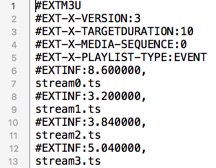
After a look in the stream.m3u8 we have a big surprise:
The given target duration of 4 seconds are not used.
Instead a TARGETDURATION of 10 is set and the segment length (value after #EXTINF:) is also not constant.
A constant value is required for a good buffering in the player.
We don’t want any interruptions.
Cause
The problem here is that the segmenter splits starts a new file only at keyframes (I-Frames).
This makes sense, because if you e.g. seek in the stream the player chooses the nearest new stream*.ts file and starts playing it.
How to solve (step 1)
-g 25 sets the group picture size to 25.
My video source has 25 FPS (25 pictures per second).
So each second will start with a new picture group.
This option forces a target size of 25 frames.
After that a new group will be created (starting with a new I-Frame).
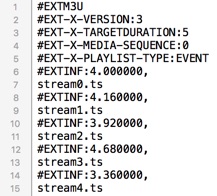
Well, now it is much closer to what we want. But there are still some glitches above and also below 4 seconds.
How to solve (step 2)
The reason for this is that FFmpeg has a scene detection. This means that always when a new scene starts an I-Frame will be set. Since it’s FFmpeg we can easily disable this feature.
-sc_threshold 0
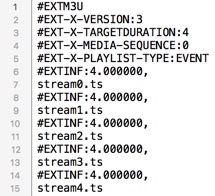
And the new playlist looks as we were expecting: Segments with the exact same duration.
The new command so far is:
ffmpeg -listen 1 -i rtmp://martin-riedl.de/stream01 \
    -c:v libx264 -crf 21 -preset veryfast -g 25 -sc_threshold 0 \
    -c:a aac -b:a 128k -ac 2 \
    -f hls -hls_time 4 -hls_playlist_type event stream.m3u8