
This is a series of articles. Follow the link here to get an overview over all articles.
Previously
on Using FFmpeg as a HLS streaming server (Part 4) – Multiple Video Resolutions.
The command until now looks like the following:
ffmpeg -listen 1 -i rtmp://martin-riedl.de/stream01 \
    -filter_complex "[v:0]split=2[vtemp001][vout002];[vtemp001]scale=w=960:h=540[vout001]" \
    -preset veryfast -g 25 -sc_threshold 0 \
    -map [vout001] -c:v:0 libx264 -b:v:0 2000k \
    -map [vout002] -c:v:1 libx264 -b:v:1 6000k \
    -map a:0 -map a:0 -c:a aac -b:a 128k -ac 2 \
    -f hls -hls_time 4 -hls_playlist_type event \
    -master_pl_name master.m3u8 \
    -var_stream_map "v:0,a:0 v:1,a:1" stream_%v.m3u8
But all stream variants are placed in one folder. We want to do here a custom folder structure.
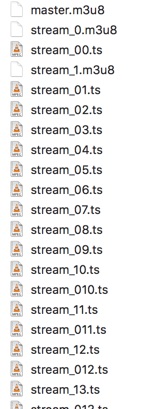
Data Folder per Stream Variant
-hls_segment_filename stream_%v/data%06d.ts
This parameters sets the name of the segment file.
In my case a folder name is added named stream_%v.
%v is the stream variant.
The %06d in the file name data%6d.ts is a formatted number.
06 means fill the number up with 0 up to 6 digits.
And the result looks great:
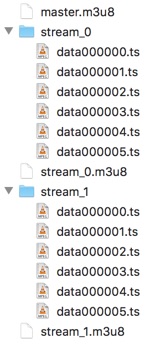
But when we try to watch the stream, no video is playing.
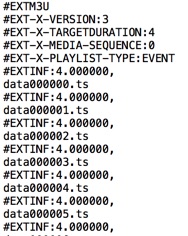
Hmm, why? A look in the stream_0.m3u8 explains it:
The path for the data.ts files is missing.
So the files are not found by the player.
Segment Folder Declaration
For this a base-url must be added to each line of data.ts.
-use_localtime_mkdir 1
This can be done by easily adding the line above. The documentation tells us following:
Used […] it will create all subdirectories which is expanded in
filename.
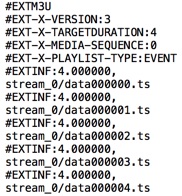
Now the folder path is added correctly in the segment playlist.
Finally
Now the full command looks like this:
./ffmpeg -listen 1 -i rtmp://martin-riedl.de/stream01 \
    -filter_complex "[v:0]split=2[vtemp001][vout002];[vtemp001]scale=w=960:h=540[vout001]" \
    -preset veryfast -g 25 -sc_threshold 0 \
    -map [vout001] -c:v:0 libx264 -b:v:0 2000k \
    -map [vout002] -c:v:1 libx264 -b:v:1 6000k \
    -map a:0 -map a:0 -c:a aac -b:a 128k -ac 2 \
    -f hls -hls_time 4 -hls_playlist_type event \
    -master_pl_name master.m3u8 \
    -hls_segment_filename stream_%v/data%06d.ts \
    -use_localtime_mkdir 1 \
    -var_stream_map "v:0,a:0 v:1,a:1" stream_%v.m3u8</pre>